Radio

Simple radio buttons
Inherits: LayoutControl, AdaptiveControl
Properties
-
active_color(Optional[ColorValue]) –The color used to fill this radio when it is selected.
-
autofocus(bool) –True if the control will be selected as the initial focus.
-
fill_color(Optional[ControlStateValue[ColorValue]]) –The color that fills the radio, in all or specific
ControlStatestates. -
focus_color(Optional[ColorValue]) –The color of this radio when it has the input focus.
-
hover_color(Optional[ColorValue]) –The color of this radio when it is hovered.
-
label(str) –The clickable label to display on the right of a Radio.
-
label_position(LabelPosition) –Defaults to
LabelPosition.RIGHT. -
label_style(Optional[TextStyle]) –The label's style.
-
mouse_cursor(Optional[MouseCursor]) –The cursor for a mouse pointer entering or hovering over this control.
-
overlay_color(Optional[ControlStateValue[ColorValue]]) –The overlay color of this radio in all or specific
ControlStatestates. -
splash_radius(Optional[Number]) –The splash radius of the circular Material ink response.
-
toggleable(bool) –Set to
Trueif this radio button is allowed to be returned to an indeterminate state by selecting it again when selected. -
value(Optional[str]) –The value to set to containing
RadioGroupwhen the radio is selected. -
visual_density(Optional[VisualDensity]) –Defines how compact the radio's layout will be.
Events
-
on_blur(Optional[ControlEventHandler[Radio]]) –Called when the control has lost focus.
-
on_focus(Optional[ControlEventHandler[Radio]]) –Called when the control has received focus.
Examples#
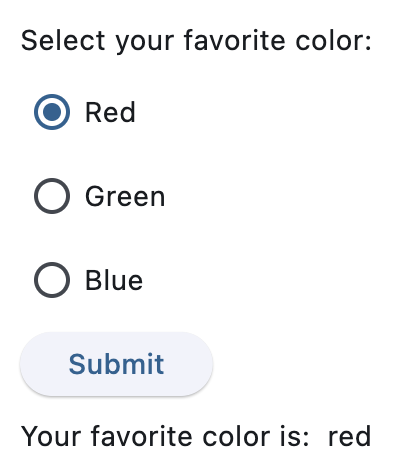
Basic Example#
import flet as ft


def main(page: ft.Page):
    def handle_button_click(e: ft.Event[ft.Button]):
        message.value = f"Your favorite color is:  {group.value}"
        page.update()

    page.add(
        ft.Text("Select your favorite color:"),
        group := ft.RadioGroup(
            content=ft.Column(
                controls=[
                    ft.Radio(value="red", label="Red"),
                    ft.Radio(value="green", label="Green"),
                    ft.Radio(value="blue", label="Blue"),
                ]
            )
        ),
        ft.Button(content="Submit", on_click=handle_button_click),
        message := ft.Text(),
    )


if __name__ == "__main__":
    ft.run(main)
Handling selection changes#
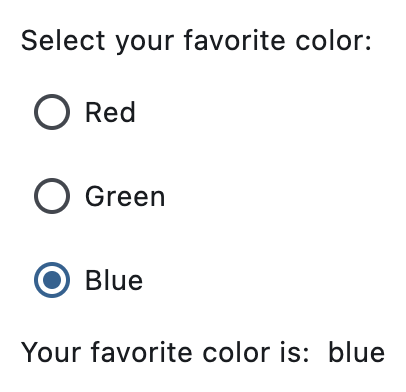
import flet as ft


def main(page: ft.Page):
    def handle_selection_change(e: ft.Event[ft.RadioGroup]):
        message.value = f"Your favorite color is:  {e.control.value}"
        page.update()

    page.add(
        ft.Text("Select your favorite color:"),
        ft.RadioGroup(
            on_change=handle_selection_change,
            content=ft.Column(
                controls=[
                    ft.Radio(value="red", label="Red"),
                    ft.Radio(value="green", label="Green"),
                    ft.Radio(value="blue", label="Blue"),
                ]
            ),
        ),
        message := ft.Text(),
    )


if __name__ == "__main__":
    ft.run(main)
Styled radio buttons#
import flet as ft


def main(page: ft.Page):
    page.add(
        ft.RadioGroup(
            ft.Column(
                controls=[
                    ft.Radio(label="Radio with default style", value="1"),
                    ft.Radio(
                        label="Radio with constant fill color",
                        value="2",
                        fill_color=ft.Colors.RED,
                    ),
                    ft.Radio(
                        label="Radio with dynamic fill color",
                        value="3",
                        fill_color={
                            ft.ControlState.HOVERED: ft.Colors.BLUE,
                            ft.ControlState.SELECTED: ft.Colors.GREEN,
                            ft.ControlState.DEFAULT: ft.Colors.RED,
                        },
                    ),
                ]
            )
        )
    )


if __name__ == "__main__":
    ft.run(main)
Properties#
class-attribute
instance-attribute
#
active_color: Optional[ColorValue] = None
The color used to fill this radio when it is selected.
class-attribute
instance-attribute
#
autofocus: bool = False
True if the control will be selected as the initial focus.
If there is more than one control on a page with autofocus set, then the first one added to the page will get focus.
class-attribute
instance-attribute
#
fill_color: Optional[ControlStateValue[ColorValue]] = None
The color that fills the radio, in all or specific ControlState states.
class-attribute
instance-attribute
#
focus_color: Optional[ColorValue] = None
The color of this radio when it has the input focus.
class-attribute
instance-attribute
#
hover_color: Optional[ColorValue] = None
The color of this radio when it is hovered.
class-attribute
instance-attribute
#
label: str = ''
The clickable label to display on the right of a Radio.
class-attribute
instance-attribute
#
label_position: LabelPosition = RIGHT
Defaults to LabelPosition.RIGHT.
class-attribute
instance-attribute
#
The label's style.
class-attribute
instance-attribute
#
mouse_cursor: Optional[MouseCursor] = None
The cursor for a mouse pointer entering or hovering over this control.
class-attribute
instance-attribute
#
overlay_color: Optional[ControlStateValue[ColorValue]] = (
    None
)
The overlay color of this radio in all or specific ControlState states.
class-attribute
instance-attribute
#
The splash radius of the circular Material ink response.
class-attribute
instance-attribute
#
toggleable: bool = False
Set to True if this radio button is allowed to be returned to an indeterminate state by selecting it again when selected.
class-attribute
instance-attribute
#
The value to set to containing RadioGroup when the radio is selected.
class-attribute
instance-attribute
#
visual_density: Optional[VisualDensity] = None
Defines how compact the radio's layout will be.
Events#
class-attribute
instance-attribute
#
on_blur: Optional[ControlEventHandler[Radio]] = None
Called when the control has lost focus.
class-attribute
instance-attribute
#
on_focus: Optional[ControlEventHandler[Radio]] = None
Called when the control has received focus.